
Feature Overview
- Checkout Session Management System, a foundational enhancement to the checkout architecture that ensures consistency, prevents concurrency conflicts, and enforces strict session-level control across all checkout interactions.
- It standardizes checkout behavior across multiple devices, tabs, browsers, and impersonation flows by introducing immutable checkout snapshots, session lifecycle management, and backend-driven validation.
Configuration Overview (Admin Console)
- Introduction of New Order Class: Checkout
- A new internal order class named Checkout has been introduced.
- Class Configuration:
- Default Number Format: CO-<DD><MM><YYYY>-<Number>
- Digit Length – 6
- Next Number – 1 (Starts with)
- Functional Behavior
- A unique checkout class number is generated for every checkout initiation.
- Used internally for tracking checkout-to-order relationships.
- Helps prevent duplication and improves traceability.
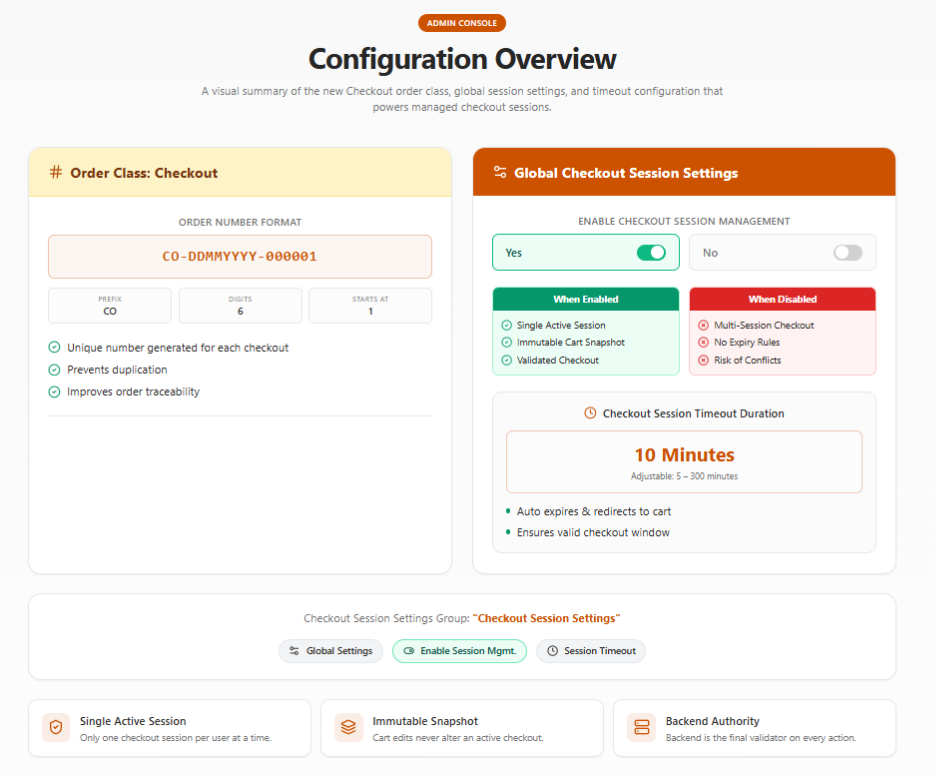
- The Checkout Session Management feature is controlled through global configuration settings, enabling administrators to define checkout behavior across all storefront users.
- All settings are grouped under:
- Group Name: Checkout Session Settings
- Entity Type: Global Settings
- Associated Attributes:
- Enable Checkout Session Management
- Checkout Session Timeout Duration (Minutes)
- Associated Attributes:
- All settings are grouped under:
- Settings Behavior:
- Checkout Session Timeout Duration (Minutes)
- Purpose:
- Defines how long a checkout session remains valid.
- Default Value
- 10 Minutes
- Allowed Range
- 5-300 Minutes
- Intended Behavior:
- At checkout initiation:
Expiry Time = Checkout Start Time + Configured Duration - Once Expired:
- Checkout becomes invalid
- Payment and order placement are blocked
- User is redirected to the Cart and is required to restart checkout.
- Business Impact:
- Ensures checkout represents a real-time, valid purchase window
- Ensures checkout represents a real-time, valid purchase window
- At checkout initiation:
- Purpose:
- Checkout Session Timeout Duration (Minutes)
Storefront Functional Behavior (End-to-End)
- Checkout Initiation Workflow
- Trigger
- User clicks Proceed to Checkout
- System Behavior
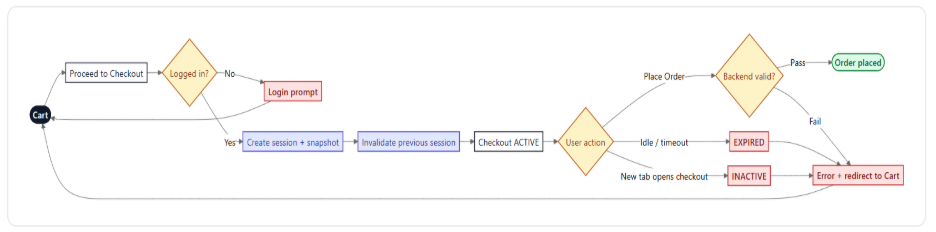
- Validates user session (including impersonation if applicable)
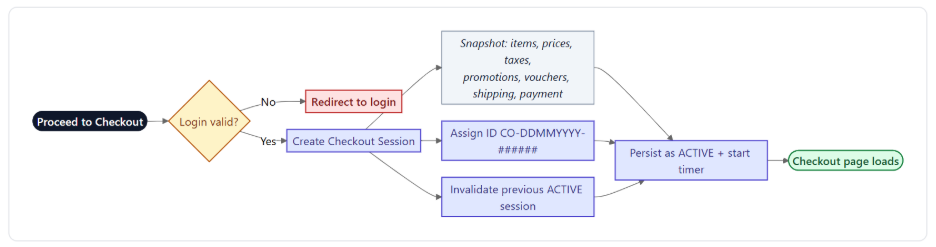
- Creates a new checkout session
- Captures a complete cart snapshot
- Assigns a unique session identifier
- Mark's session as active
- Invalidates any previously active session
- Outcome
- Only the latest checkout is valid and is available for Order Placement.
- Only the latest checkout is valid and is available for Order Placement.
- Trigger
- Checkout Snapshot Behavior
- Checkout captures:
- Items
- Pricing
- Taxes
- Promotions
- Vouchers (if applied)
- Shipping Method (if selected)
- Payment Method (if selected)
- Outcome:
- Checkout remains stable and predictable
- Checkout remains stable and predictable
- Checkout captures:
- Multi-Tab / Multi-Device Handling
- Scenario:
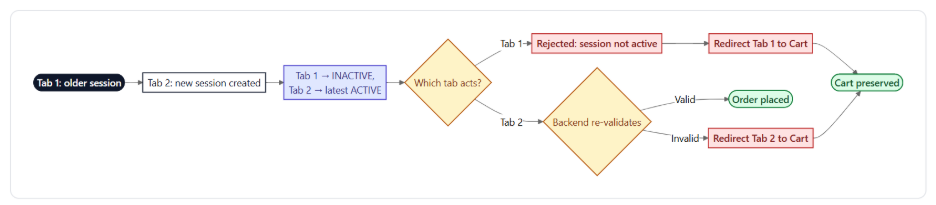
- User opens checkout in multiple tabs/devices
- System Behavior:
- The latest checkout session becomes active
- All previous sessions have become inactive
- User Impact:
- Attempting actions in an older session results in:
- Blocked operation
- Pay and Submit
- Place Order
- Submit for Approval
- Outcome:
- Prevents duplicate orders and payment conflicts
- Prevents duplicate orders and payment conflicts
- Scenario:
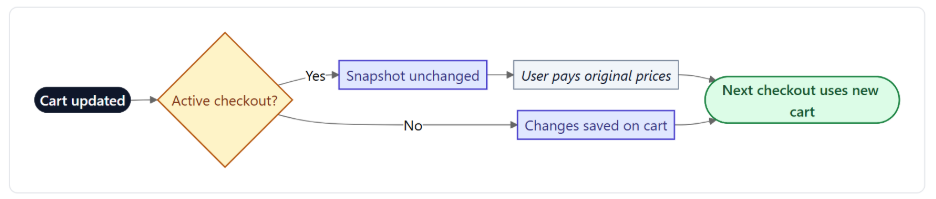
- Cart and Checkout Isolation
- Cart remains independent of checkout session
- Actions such as:
- Adding Items
- Updating Quantity
- Latest Cart Changes➡️ Apply only to future checkout sessions
- Outcome:
- No unintended changes during checkout.
- No unintended changes during checkout.
- Order Placement Validation
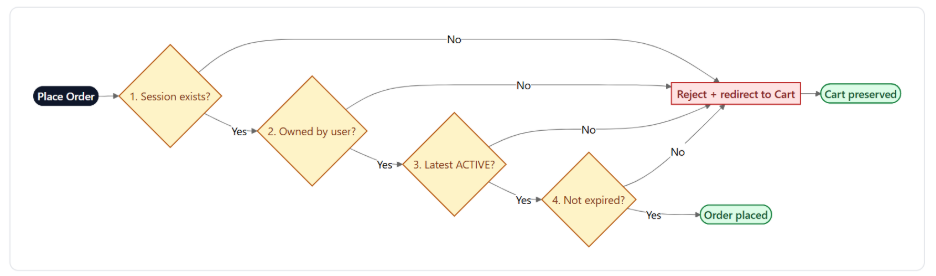
- Before placing an order, the system validates:
- Session exists
- Session belongs to the current user
- Session is the latest and most active
- Session has not expired
- Failure Behavior:
- If validation fails:
- The order is blocked
- User receives error message
- User is redirected to Cart
- If validation fails:
- Outcome:
- Prevents invalid or duplicate order submissions
- Prevents invalid or duplicate order submissions
- Before placing an order, the system validates:
- Checkout Session Expiry
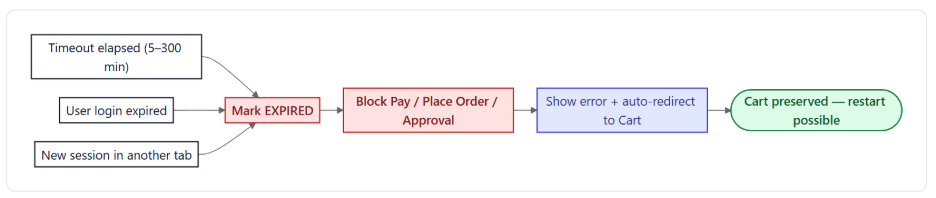
- Trigger Conditions:
- Timeout exceeded
- User session expires
- New checkout session created
- System Behavior:
- Session becomes expired
- All checkout actions are blocked:
- Payment initiation
- Order placement
- User:
- Redirected to Cart and
- An error message is displayed.
- Outcome:
- Ensures only valid sessions proceed for Order Placement
- Ensures only valid sessions proceed for Order Placement
- Browser and Navigation Handling
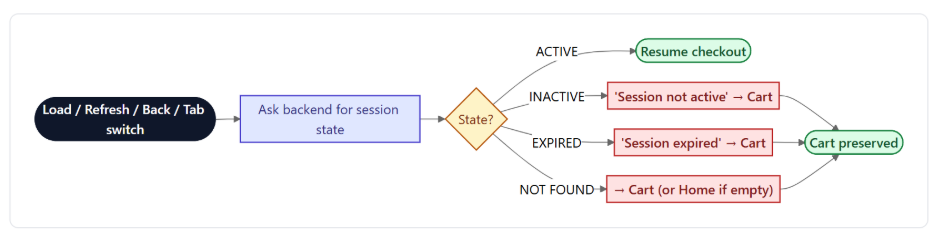
- System re-validates session during:
- Page load
- Page refresh
- Browser Back/Forward
- Tab switching
- Behavior based on Session State
Session State System Behavior ACTIVE Resume checkout INACTIVE/EXPIRED Block + redirect/message NOT_FOUND Redirect to cart/home - Outcome:
- Prevents access to invalid checkout states
- Prevents access to invalid checkout states
- System re-validates session during:
- Error Handling & Recovery
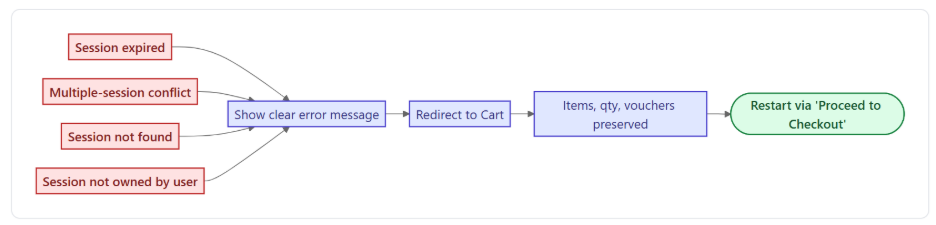
- Common error scenarios:
- Expired session
- Multiple session conflict
- Session not found
- System Response:
- Display a clear message
- Redirect user to cart
- Preserve cart items
- Outcome:
- Smooth recovery without data loss
- Smooth recovery without data loss
- Common error scenarios:
- Behavioral Points:
- Only one active checkout session per user
- Checkout is a fixed snapshot
- Backend is the final authority for validation
- Checkout expiry does not affect the cart
- Configuration changes apply only to new checkout sessions
- No real-time synchronization between cart and checkout
- Important Points:
- The current implementation includes hardcoded validation checks to verify the validity of the Checkout Session at the following stages:
- Place Order / Submit for Approval
- Pay Now and Submit
- Additional validation checks can also be introduced at the following stages, as the existing APIs are fully compatible with such enhancements:
- Shipping Method Selection or Modification
- Validation can be implemented at the project level during shipping method selection or updates.
- Payment Method Selection
- Additional checks can be incorporated during payment method selection without requiring API-level changes.
- Promotions and Coupons/Vouchers
- Validation logic related to promotions and coupon application can be added at the project level.
- Shipping Method Selection or Modification
- Performance Impact:
- While adding validation checks at multiple stages improves data consistency and session validation accuracy, excessive validation across the checkout flow may introduce additional processing overhead. Under high storefront traffic or heavy workloads, this could potentially impact overall checkout performance and response times.
- Therefore, it is recommended to carefully evaluate the trade-off between validation coverage and system performance before enabling checks across multiple touchpoints in the checkout lifecycle
- The current implementation includes hardcoded validation checks to verify the validity of the Checkout Session at the following stages:
- Known Limitations:
- Issue 1: Checkout Session Invalidation During Payment (Multi-Tab)
- When the same cart is opened in multiple tabs, initiating checkout in one tab while a payment is processing in another can invalidate the active checkout session. This causes the user to be redirected back to the Cart page during payment processing. The issue creates a race condition that may lead to inconsistent payment and order states, making it unclear whether the payment succeeded or the order was created successfully.
- Issue 2: Direct Access to Checkout URL
- If a user directly accesses the /checkout URL without a valid checkout session, they are redirected to the Cart page along with a validation message.
- Issue 3: Inconsistent Cart Persistence After Last Item Removal in Checkout
- Removing the final line item from Checkout → Order Summary ends the checkout session and redirects the user to the Cart page; however, the cart reloads with previously removed items still present. This creates a state synchronization issue between checkout and cart data, leading to confusion about whether item removal actions were successfully applied.
- Issue 1: Checkout Session Invalidation During Payment (Multi-Tab)
- Trigger Conditions: